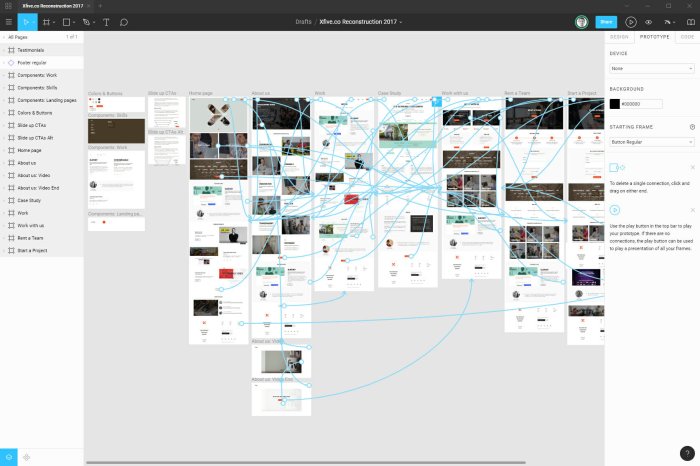
Figma to website workflow is an essential process that bridges the gap between stunning design and functional web development. By understanding the steps involved in converting Figma designs into responsive web pages, you can ensure a seamless transition that maintains the integrity of your original vision.
This process involves utilizing the right tools and software, addressing common challenges, and applying best practices to create a website that not only looks great but performs well across various devices. With the right guidance, you can streamline your workflow and enhance your web design projects.
Figma to Website Workflow
The process of converting designs created in Figma into a fully functional website involves several essential steps. This workflow not only ensures that the final product aligns with the original vision but also that it functions smoothly across various devices. Understanding this workflow is crucial for both designers and developers to collaborate effectively.To transition from Figma designs to responsive web pages, follow these steps:
1. Design Preparation
Ensure that all design elements in Figma are organized, labeled, and ready for export. Group similar elements and use consistent styles to maintain clarity.
2. Export Assets
Use Figma’s export function to save images, icons, and other graphical elements in appropriate formats (PNG, SVG, etc.). Ensure that the assets are optimized for web use to enhance loading times.
3. HTML Structure Setup
Begin coding by creating an HTML structure that mirrors the layout of your Figma design. This structure serves as the backbone of your website.
4. CSS Styling
Implement styles using CSS to replicate the visual aesthetics of your Figma design. Utilize Flexbox or Grid for responsive layouts and ensure that all text styles, colors, and spacing match the design.
5. JavaScript Functionality
If your design includes interactive elements, add JavaScript as needed to implement functionality. This could involve animations, modals, or form validations.
6. Responsive Adjustments
Test the website across different devices and screen sizes. Adjust styles and layouts using media queries to ensure a responsive design that provides a seamless user experience.
7. Testing and Debugging
Conduct thorough testing to identify and fix any bugs or inconsistencies. Use tools like Chrome DevTools to debug and refine your code.
8. Deployment
Once everything is functioning correctly, deploy the website to a server or hosting platform for public access.
Tools and Software for Workflow Transition
Utilizing the right tools and software is vital for a seamless transition from design to development. The following tools enhance efficiency and collaboration in the workflow:
Figma
The primary design tool for creating user interfaces. It allows designers to collaborate in real-time and provides features for exporting design assets.
Code Editor (e.g., Visual Studio Code, Sublime Text)
Essential for writing and editing HTML, CSS, and JavaScript code. Most code editors offer extensions that enhance productivity.
Version Control (e.g., Git)
A system to track changes and collaborate on code. It helps manage different versions of the project and allows multiple developers to work simultaneously without conflicts.
Cross-Browser Testing Tools (e.g., BrowserStack)
These tools allow developers to test how their website appears on various browsers and devices, ensuring consistent user experience.
CSS Frameworks (e.g., Bootstrap, Tailwind CSS)
Frameworks simplify the styling process and help create responsive designs more quickly with pre-built components.
Common Challenges and Solutions in the Transition
Transitioning from Figma to a live website often presents several challenges that can impact workflow. Addressing these issues proactively can lead to smoother development. Here are some common challenges along with their solutions:
Design Fidelity
Maintaining the integrity of the original design during the coding process can be challenging. To mitigate this, conduct regular design reviews and use pixel-perfect coding techniques.
Asset Management
Managing exported assets can lead to confusion. Implement a systematic naming convention for files and organize them into folders to streamline access.
Responsive Design Issues
Ensuring the design looks good on all devices is critical yet challenging. Use responsive design frameworks and test on multiple devices early in the process to catch issues.
Communication Gaps
Miscommunication between designers and developers can lead to discrepancies. Establish regular check-ins and use tools like Slack or Trello for ongoing discussions and updates.
Browser Compatibility
Variations in how browsers render websites can cause unexpected issues. Utilize CSS resets and conduct thorough cross-browser testing to identify and address compatibility issues early.
“Effective communication and the right tools are the keys to a successful Figma to website workflow.”
Web Hosting and Domain Names
Choosing the right web hosting service and domain name is crucial when deploying a website. The hosting service acts as the backbone of your online presence, impacting your website’s speed, security, and reliability. Similarly, your domain name is your website’s address on the internet, playing a significant role in branding and search engine optimization. Understanding these components helps ensure your website operates smoothly and effectively reaches your audience.
Importance of Choosing the Right Web Hosting Service
Selecting a reliable web hosting service impacts various aspects of your website, including performance, uptime, and customer support. A good host ensures that your site is available to visitors at all times, with minimal downtime. Additionally, quality hosting offers essential features such as SSL certificates for security, scalable resources for growth, and robust customer support to assist with any issues that may arise.
A reliable host can make the difference between a thriving website and one that struggles to deliver.
Steps to Register a Domain Name and Connect it to a Web Hosting Account
Registering a domain name is a straightforward process that involves a few essential steps. Here’s how to secure your domain and link it to your hosting provider:
1. Choose a Domain Name
Select a name that reflects your brand or the purpose of your website. It should be easy to remember and type.
2. Check Availability
Use a domain name registrar to check if your desired domain name is available for registration.
3. Register the Domain
Once you find an available domain, complete the registration process through a domain registrar. Be prepared to provide personal information and payment details.
4. Connect to Your Hosting Account
Log into your web hosting account and navigate to the domain settings. Here, you can input the domain name you registered and configure the DNS settings to point to your hosting provider.
Connecting a domain to your host may take several hours to fully propagate across the internet.
Differences Between Shared, VPS, and Dedicated Hosting Options
Understanding the different types of web hosting options is crucial for selecting the right fit for your website’s needs. Below are the three main types of hosting along with their key features:
Shared Hosting
Multiple websites share the same server resources, making it a cost-effective option for small websites or starting businesses.
Ideal for low-traffic sites, it typically has limitations on bandwidth and storage.
VPS Hosting
A Virtual Private Server (VPS) divides a physical server into multiple virtual servers, offering more dedicated resources and improved performance compared to shared hosting.
Suitable for growing websites that require more power and flexibility without the cost of a dedicated server.
Dedicated Hosting
A dedicated server is exclusively reserved for one user, providing maximum performance, security, and control over server configurations.
Best for high-traffic websites or applications with specific technical requirements that demand extensive resources.
Choosing the right hosting type according to your website’s needs can enhance performance and user experience significantly.
Web Design and Development

Effective web design and development are crucial for creating user-friendly, engaging websites. A well-designed site not only captivates visitors but also guides their journey, enhancing overall satisfaction and encouraging repeat visits. Understanding the interplay between design and development is essential for optimizing user experience and achieving business goals.
Principles of Effective Web Design
The principles of effective web design focus on creating a seamless user experience. Key aspects include:
- Usability: Websites should be intuitive and easy to navigate, ensuring users can find the information they need without confusion.
- Aesthetic Design: Visual appeal plays a significant role in attracting and retaining users. Color schemes, typography, and layout should be harmonious and aligned with the brand’s identity.
- Responsive Design: With the rise of mobile devices, websites must adapt to various screen sizes. A responsive design enhances accessibility and improves user engagement.
- Consistency: Maintaining consistent design elements across all pages reinforces branding and creates a sense of reliability.
- Loading Speed: A fast-loading website significantly impacts user retention. Users are more likely to abandon sites that take too long to load.
Comparison of Front-End and Back-End Development Technologies
Front-end and back-end development serve different purposes in the web development process. Front-end development refers to the visual elements of a website that users interact with directly. Technologies such as HTML, CSS, and JavaScript are the backbone of front-end development. These tools empower developers to create engaging interfaces that align with user expectations.In contrast, back-end development manages the server-side of a website.
It deals with data storage, security, and application logic. Technologies like PHP, Ruby on Rails, and Node.js are commonly used in back-end development. This side ensures that the front end can access necessary data and perform functions correctly.Both front-end and back-end development are essential for a fully functional website. Understanding their differences helps developers work more effectively in creating cohesive web applications.
Best Practices for Optimizing Website Performance and Speed
Website performance and speed are vital for maintaining user engagement and improving search engine rankings. Implementing best practices can lead to significant improvements.
- Image Optimization: Compress and resize images for faster loading times without sacrificing quality.
- Minification of Resources: Minify CSS, JavaScript, and HTML files to reduce file size and improve loading speed.
- Use of Content Delivery Networks (CDNs): CDNs distribute website content across various servers worldwide, decreasing load times for users far from the origin server.
- Browser Caching: Enable caching to store static resources on users’ devices, reducing the need for repeated downloads during subsequent visits.
- Reduce Server Response Time: Optimize server performance and leverage efficient hosting solutions to minimize delays in serving content.
“Optimizing website speed is not just about technology; it’s about user experience and satisfaction.”
Concluding Remarks
In summary, mastering the Figma to website workflow equips you with the knowledge to transform your designs into live websites effectively. Embracing the right tools and methodologies not only simplifies the development process but also contributes to creating an exceptional user experience. Take these insights and elevate your web projects to new heights!
Question & Answer Hub
What is the Figma to website workflow?
It is the process of converting Figma design files into functional web pages by following a series of steps that include exporting assets and coding.
What tools are recommended for this workflow?
Commonly used tools include Figma itself for design, code editors like Visual Studio Code, and development frameworks such as React or WordPress.
How can I ensure my website is responsive?
Utilize flexible layouts and responsive design principles, ensuring that your design adapts to different screen sizes and devices.
What challenges can arise during this transition?
Challenges may include discrepancies between design and implementation, performance issues, and difficulties in translating complex interactions.
How do I optimize my website’s performance?
Focus on optimizing images, minifying CSS and JavaScript files, and employing caching techniques to enhance loading speed.


